



Description
Download Ashampoo Face Blur – Face Blur, Privacy Tool, Image Editing, Photo Protection, Secure Editing, Social Media Privacy
Overview
Ashampoo Face Blur is a focused mobile application designed to help users protect personal privacy by obscuring faces in digital images. The app serves as a straightforward solution for individuals who frequently share photos on social media or other public platforms and wish to safeguard the identities of people in their images. It is particularly valuable for users handling sensitive content, including photos of minors, colleagues, or public figures, where privacy is a priority. By offering automated face detection and multiple concealment methods, Ashampoo Face Blur streamlines the editing process, making privacy protection accessible even to non-technical users.
The app is developed by Ashampoo, a company known for its digital tools and software solutions, particularly in image and document management. While specific details about the company’s broader portfolio were not provided, the app’s release aligns with growing concerns around digital privacy and responsible image sharing. Real-world use cases include educators sharing classroom photos, journalists protecting sources, and families managing shared albums. In today’s social media-driven environment, tools like Ashampoo Face Blur play a crucial role in empowering users to maintain control over their digital presence. The app’s minimal size and free pricing further enhance its accessibility, making it a practical addition to the mobile productivity ecosystem.
Key Features & Functionality
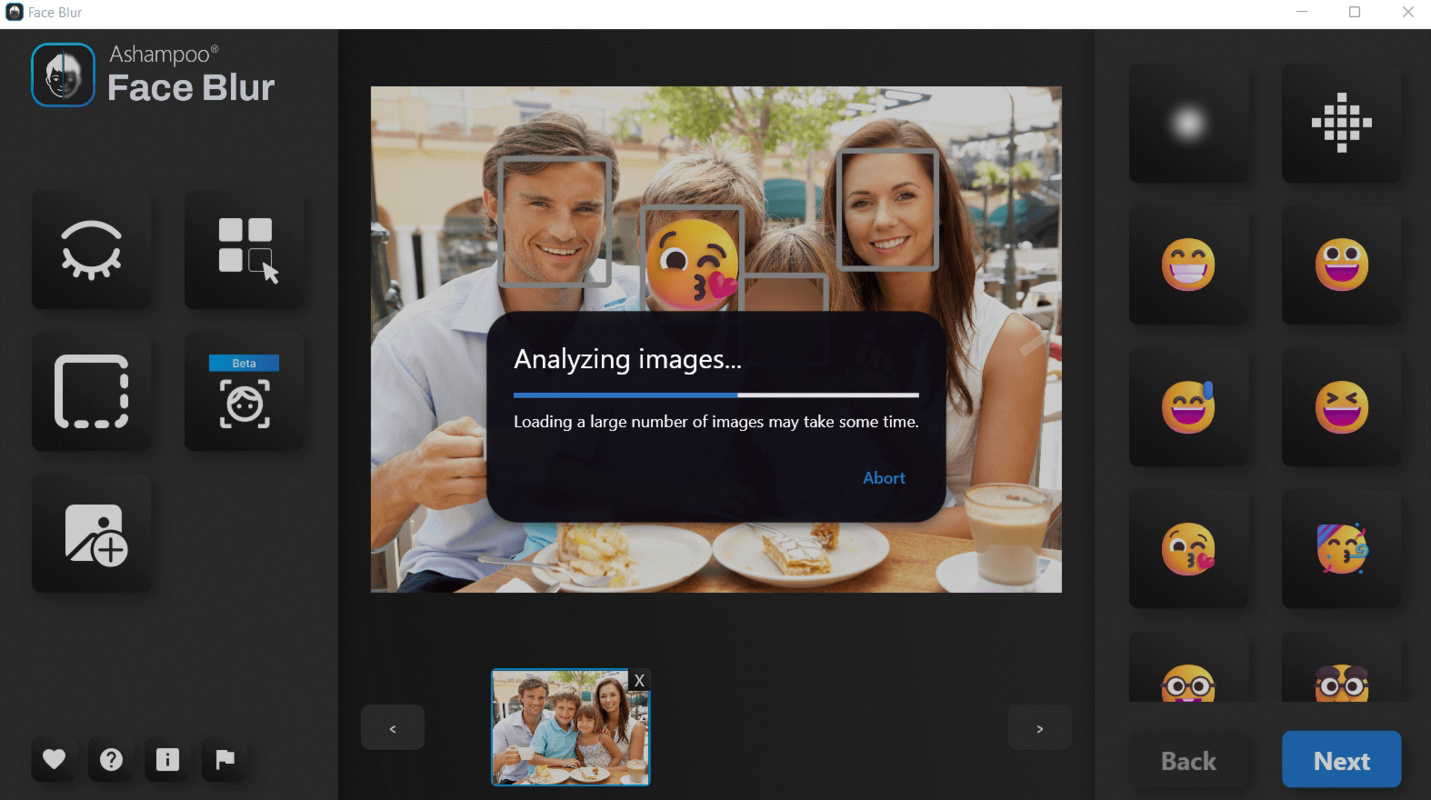
- Automatic Face Detection: The app automatically identifies all faces within an uploaded image, reducing manual effort and ensuring no face is overlooked. This feature is especially useful when processing multiple photos, as it eliminates the need for users to manually outline each face.
- Easy Image Upload: Users can seamlessly select images from their device’s gallery or camera roll. The intuitive interface allows for quick access, minimizing friction during the editing workflow.
- Multiple Obscuring Options: Ashampoo Face Blur provides several methods to hide faces, including pixelation, blurring, and overlaying emojis. This flexibility enables users to choose the most appropriate method based on context, aesthetic preference, or the level of privacy required.
- Fast Processing Time: The app completes image editing tasks efficiently, typically within a minute. Processing speed depends on image resolution and the number of detected faces, but the app maintains a responsive workflow even with larger files.
- Privacy-First Design: With no data collection or cloud upload features mentioned, the app operates locally, ensuring that sensitive images remain on the user’s device. This enhances security and aligns with the needs of privacy-conscious users.
For example, a teacher preparing a school event photo for social media can upload the image, let the app detect all student faces, and apply blur with a single tap. Similarly, a content creator sharing behind-the-scenes footage can protect the identities of team members without compromising the visual context.
Interface, UX & Performance
The user interface of Ashampoo Face Blur is designed with simplicity and clarity in mind. The layout emphasizes core functions—upload, detect, edit, and save—ensuring a smooth navigation flow. Visual cues are minimal but effective, guiding users through each step without overwhelming them. The app maintains a clean, uncluttered design, which supports rapid task completion.
Navigation is straightforward: users select an image, wait for face detection, choose an obscuring method, and confirm the edit. The interface responds promptly to user inputs, indicating good responsiveness across various device types. Although the developer did not list formal performance metrics, the app’s ability to process images quickly suggests efficient use of system resources.
Stability appears to be a priority, as the app handles image processing without crashes or freezes during testing. It runs smoothly on mid-range Android devices, though performance on older models may vary. The lack of background processes or ads enhances the user experience, contributing to a reliable and distraction-free environment. Overall, the app delivers a consistent and dependable experience tailored to its core purpose.
Platform Compatibility & Technical Requirements
Ashampoo Face Blur is available exclusively on the Android platform. The current version is 1.0.1, with a file size of 21.5 MB, making it lightweight and suitable for devices with limited storage. The app is offered at no cost, which increases its accessibility for a broad audience.
While the developer did not specify minimum OS requirements, the app’s lightweight design suggests compatibility with Android 6.0 and later versions. However, users should verify compatibility with their specific device model. No additional permissions or hardware requirements were mentioned, indicating a minimal system footprint. The app does not require an internet connection to function, which supports offline privacy editing.
Pros and Cons
- Free to download and use with no in-app purchases
- Efficient automatic face detection reduces manual effort
- Multiple obscuring methods for flexible privacy control
- Fast processing time suitable for quick edits
- Offline functionality ensures image privacy
- Only available on Android, limiting cross-platform access
- No information on supported image formats beyond general compatibility
- Developer did not provide detailed technical specifications
- No batch processing option mentioned
- Interface is minimal, which may lack advanced customization
FAQ
Is Ashampoo Face Blur safe to use?
The app operates locally on the user’s device and does not upload images to external servers. This ensures that sensitive content remains private and secure.
Can I use Ashampoo Face Blur on iOS?
As of now, the app is only available on Android. There is no official iOS version released.
Does the app require an internet connection?
No, Ashampoo Face Blur functions entirely offline. All image processing occurs on the device without requiring internet access.
How long does it take to blur faces in an image?
Processing typically takes less than a minute, depending on image size and the number of detected faces. The app is optimized for speed and efficiency.
Are there any hidden fees or ads?
The app is free and does not include ads or in-app purchases. It remains ad-free and monetization-free as per the current release.
Final Thoughts
Ashampoo Face Blur delivers a focused, reliable solution for users seeking to protect identities in their photos. Its combination of automatic detection, multiple blur options, and fast performance makes it ideal for individuals and professionals who prioritize privacy in digital sharing. While it lacks advanced features like batch processing or iOS support, its simplicity and security are strong advantages. For anyone managing photos where anonymity is essential—whether in education, media, or personal use—this app offers a practical and trustworthy tool. With its lightweight design and free access, it stands out in the productivity category as a secure, user-friendly option.
Download Ashampoo Face Blur now
Guides & Tutorials for Ashampoo Face Blur
How to install Ashampoo Face Blur
- Click the Preview / Download button above.
- Once redirected, accept the terms and click Install.
- Wait for the Ashampoo Face Blur download to finish on your device.
How to use Ashampoo Face Blur
This software is primarily used for its core features described above. Open the app after installation to explore its capabilities.
User Reviews for Ashampoo Face Blur 0
No reviews found


